The platform generates downloadable deliverables and retains supported elements in Word, Excel and PowerPoint files.
Language operations for personal, professional and business use
I don’t need an answer.I need the document translated.
The difference is in the result.
Braivix is an AI platform for translating documents, extracting and translating text from images, transcribing audio and video, and generating subtitles. Upload your file, see the credit usage before you confirm, and download a ready-to-use result for personal, professional or team needs.
No credit card required Files up to 200 MB Cost shown before processing
Opportunity Translations, Braivix’s strategic partner.
1234
Review before processing
See the usage before you decide
DOC
Selected documentSupported format · up to 200 MB
Current balanceVisible in your account
This processCalculated after upload
No credits used before confirmation
Translated fileReady to download
- 20 free creditsFor any solution
- More than 40 languagesOn a single platform
- Up to 200 MBPer supported file
- Credits shown up frontBefore you confirm
Try any solution for free
20 credits to try the solution you need
Use your free credits with any solution available on the platform, provided the stated usage for your file does not exceed 20 credits.
- Documents
- Images
- Audio
- Video
Trial limitUp to 20 credits
The total is shown after upload and before confirmation.
Try it free with 20 creditsSide-by-side result
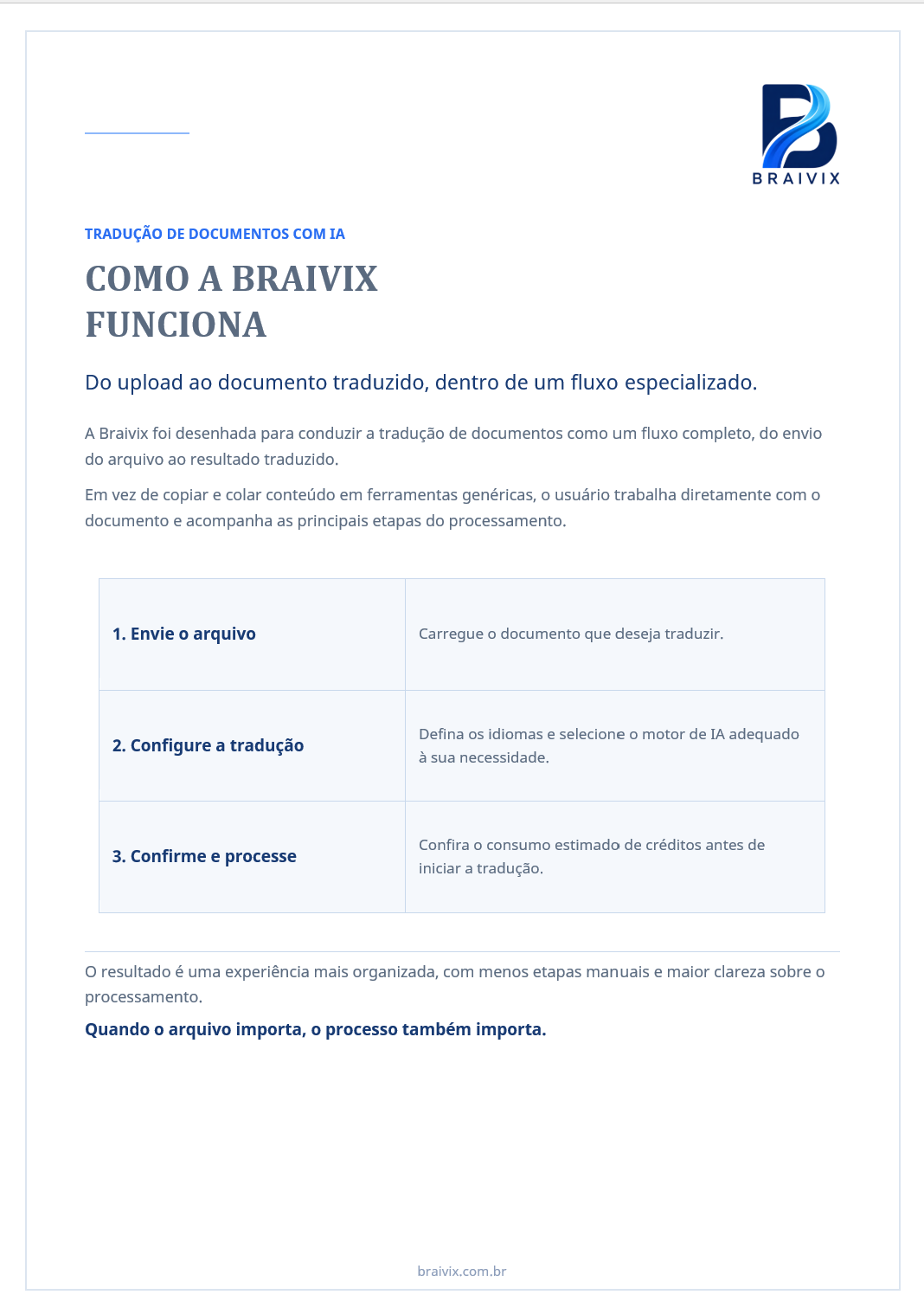
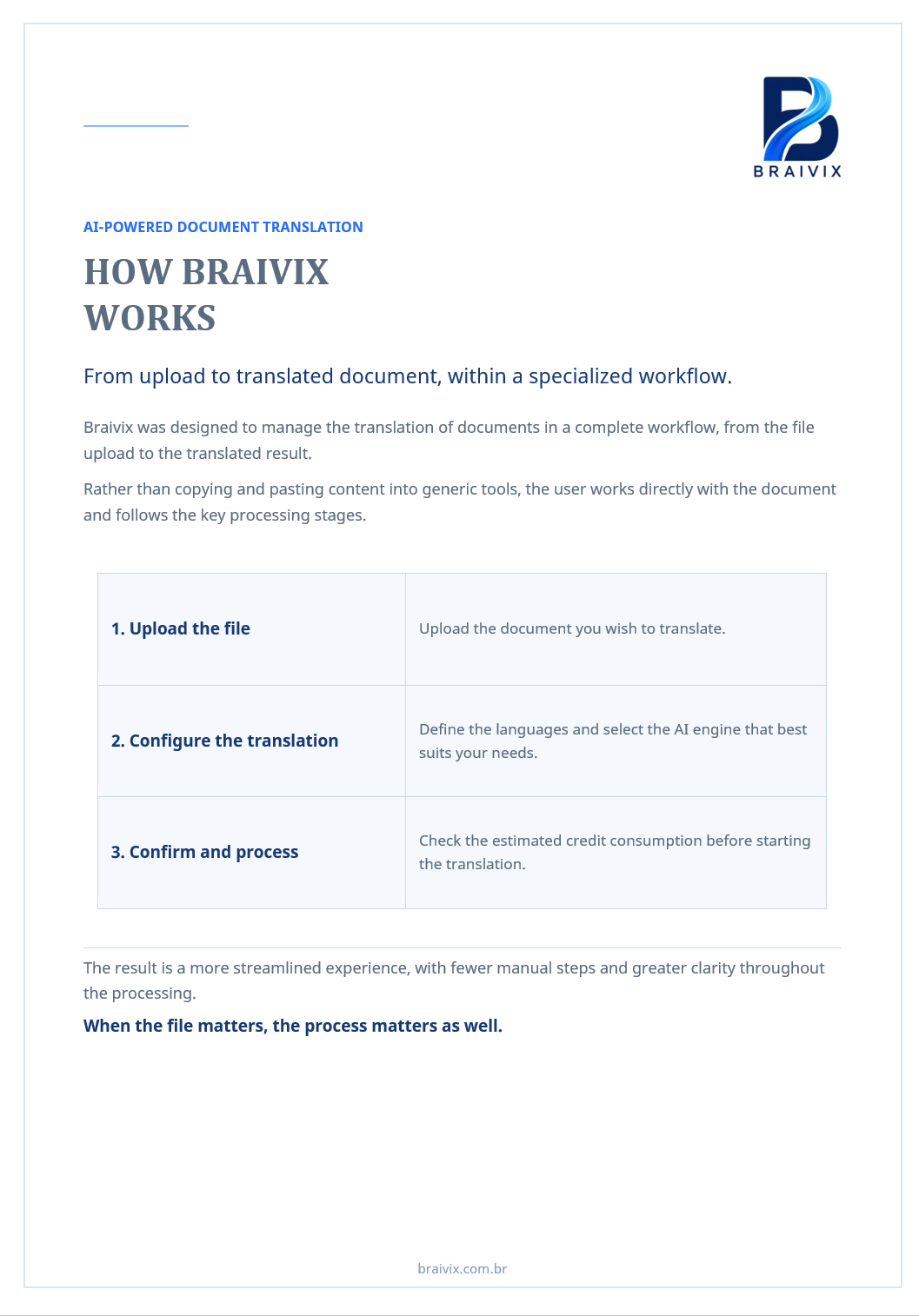
From the Portuguese document to a ready-to-use English version
See a demonstration of how the translated content remains within the document, while the visual organization is retained for supported elements.
- Visual structure retained
- Text translated within the file
- New document ready to download
Translate my first document 20 free credits. No credit card required.
Demonstration only. Preservation may vary depending on the format and the elements contained in the file.
Three ways to handle your requirements
Braivix, general-purpose AI or traditional translation: how does the final delivery differ?
The difference is not about rejecting AI or human expertise. It is about applying the right workflow to each project’s requirements, volume and level of support.
| Criterion | Integrated solutionBraivix + Opportunity TranslationsTechnology and specialists | General-purpose toolsGeneral-purpose AI toolsUser-directed output | Project-based serviceTraditional translation modelProfessional human service |
|---|---|---|---|
| Final file | The platform generates downloadable deliverables and retains supported elements in Word, Excel and PowerPoint files. | The output and preservation of the file vary by tool and format. | Delivery may include translation, review and desktop publishing when included in the project scope. |
| Confidentiality | After download, processed files are automatically deleted from the platform, and Braivix does not use their content for its own AI training. Assisted projects are subject to their own terms. | Data policies vary by provider, plan and configuration. | File handling depends on the agreement and controls adopted for each project. |
| Lead time and start | Automated workflows begin after confirmation. Assisted projects follow the agreed schedule. | The response may be immediate. Preparation, checking and finalization depend on the tool and the workflow adopted by the user. | Work normally begins after requirements gathering, quotation, approval and team availability. |
| Cost and usage | The platform shows the required credits before confirmation. Specialist services can be contracted separately according to scope. | Pricing models vary. Preparation, checking and finalization may still be the user’s responsibility. | Pricing is defined per project based on scope, deadline and contracted services. |
| Human support | Braivix provides autonomy; Opportunity Translations acts as a strategic partner for specialist requirements. | Dedicated language support depends on the service offered by the provider. | Human support accompanies the project according to the contracted terms. |
| Scale | The platform handles recurring needs and supported files; Opportunity Translations complements projects that require specialists. | Limits and processing options for large files vary by tool, plan and configuration. | Capacity and schedule depend on the team assigned to the project. |
| Context and quality | Subject area, topic and instructions are part of the workflow. Human expertise can be contracted separately when the project requires it. | Context is guided by the instructions and validation features available in the tool. | Professionals work with a brief, reference materials and terminology according to the project. |
| Use and management | Use Braivix individually or organize departments, people, credit allocation and team usage history. | Individual-use and team-management features vary by tool and plan. | Management is usually organized by order, project, cost center or agreed reporting. |
| Scope | It brings together documents, images, audio and video, with access to specialist services from Opportunity Translations when needed. | It is a broad tool whose uses and output formats vary by provider. | It covers language services defined and managed under each engagement. |
Final file
Confidentiality
Lead time and start
Cost and usage
Human support
View more criteria
Scale
Context and quality
Use and management
Scope
This comparison describes typical characteristics. Features, policies, lead times and terms vary by provider, plan, format and scope. Human involvement from Opportunity Translations is defined under a separate engagement.
Braivix + Opportunity Translations
When should you use Braivix, and when should you engage specialists?
Some requirements call for autonomy, speed and scale. Others require analysis, certification, interpreting or specialist support. The two approaches work together.
01
Braivix platform
Resolve requirements independently and scale with ease
Use Braivix directly for personal, professional or team needs, without waiting for a traditional translation project to be set up.
- Documents, images, audio and video
- Usage shown before confirmation
- Individual use or management by department, user and credits
- Deliverables ready to download
02
For requirements that need specialists
The strategic partner can be engaged separately when a project requires human expertise and a dedicated scope.
- Professional translation and linguistic review
- Sworn translation by an authorized professional
- Simultaneous or consecutive interpreting
- Consultative support for specific projects
One strategy, two complementary pathsAutomate repeatable work. Engage specialists when the project requires human expertise.
How it works
See the usage before you decide
A short, predictable path from the file you have to the result you need.
Try it free with 20 creditsUpload
Choose a solution and upload a file of up to 200 MB.
Review
See exactly how many credits will be used.
Confirm and download
Authorize processing and receive your deliverable.
Confidentiality throughout the workflow
Your content is used for processing. Not for training.
Personal and professional files may contain contracts, financial data, HR information, research, projects and strategies. How the file is handled should be part of your decision.
Learn how your files are handledNot used for training
Braivix does not use content, translations, transcripts, subtitles or instructions for its own AI training.
Automatically deleted after download
Once you download the deliverable, the processed files are automatically deleted from the platform.
Usage history without file content
When team management is used, the history records the department, user, credits and time of use without retaining the file.
Upload Processing Delivery Automatic deletion
Digital solutions
Translation, transcription and subtitling in one workflow
Translation, content extraction, transcription and subtitling follow the same process: upload, visible usage, confirmation and delivery.
Core solution
Translated documents remain documents
Translate Word, Excel, PowerPoint and TXT files into more than 40 languages. Specify the subject area, topic and additional instructions without relying on a complex prompt.
- Structure and formatting retained for supported elements
- Context included in the same workflow
- New file ready to download
Compatibility by solutionYour everyday files, all in one workflow
Up to 200 MBDocuments
WordExcelPowerPointTXT
Images
JPEGPNGGIFWebP
Audio
MP3MP4M4AWAVWebMOGGFLACAAC
Video
MP4WebMMOVAVIMKV
Choose a solution, upload a supported format and review the credits before confirming.
Extract and translate
Images
Extract text from images and translate it when needed.
Illustrative preview
Uploaded imageText detectedExtraction + translation
- Result
- Extracted text, translated on request.
- Use cases
- Scans, screenshots, study materials and graphic content.
Separate speakers and timestamp each segment
Audio
Receive a transcript organized by timestamps and participants, such as Speaker 1 and Speaker 2.
Illustrative preview
Speaker 1Speaker 2
- Result
- Timestamped transcript with speaker separation.
- Use cases
- Meetings, classes, interviews, research and testimonials.
Transcribe, translate and subtitle
Video
Choose subtitle text in a document, a new subtitled video, or both.
Illustrative preview
Subtitles embedded in the video
- Result
- Subtitle document, subtitled video, or both.
- Use cases
- Training, webinars, personal content and social media.
For different needs
Who can use Braivix?
Choose the solution based on your file and the result you need, whether for personal, professional or team use.
01
Personal use and studies
Personal documents, résumés, research, assignments and academic materials.
Example: translating a résumé or study material.02
Professionals and freelancers
Proposals, contracts, presentations, portfolios and client content.
Example: preparing a proposal for an international client.03
Legal and compliance
Contracts, policies, terms and supporting documents.
04
Engineering and operations
Manuals, reports, specifications and technical materials.
05
Marketing and content
Campaigns, presentations, audio, video and social media content.
06
Finance, HR and regulatory affairs
Spreadsheets, policies, communications, reports and technical materials.
When sworn translation, official legal validity or formal certification is required, contact the Opportunity Translations team.
Customer feedback
Braivix users highlight speed, clarity and final quality
Feedback shared by people who used Braivix to process documents.
Approximately 3 minutesBruna L.’s experience, from upload to downloadLess than 1 minuteVanessa D.’s experience after using the platform
“I completed my first translations on the platform and was very impressed by the experience. From uploading to downloading the material, the process took approximately three minutes. It was incredible.”
“The Braivix platform exceeded my expectations in speed, intuitive interface and the final quality of the documents.”
“Braivix goes beyond an automated translation tool. It works as an extension of our team.”
“The Braivix platform makes it much easier to manage our firm’s translation requirements.”
“I’ve just used it. I loved it! Absolutely impressive. Less than a minute.”
Testimonials were originally provided in Portuguese and translated into English for this page. Processing time and credit usage may vary depending on the file’s type, size, duration, format and complexity.
Recognition and support
Programs supporting Braivix’s growth
Braivix participates in important support and acceleration programs.


From individual use to team management
Start on your own. Organize users and credits when you need to.
Use Braivix individually or, for teams and companies, mirror your department structure, allocate credits and track usage.
Organize departments and users
Build a hierarchy that reflects your organization.
Reallocate the available balance
Adjust credit allocation as priorities change.
Track usage
See the department, user, credits and time of use.
Departments and users
CompanyLegal1,240 cr.3 usersMarketing850 cr.Finance760 cr.Company / Legal
Credits and users
Allocated balance1,240 credits
Users with access3 users
Usage historyNo file content
DepartmentUserCreditsWhen
DepartmentLegalUserUser 03Credits18
DepartmentMarketingUserUser 08Credits12
DepartmentFinanceUserUser 02Credits7
Platform plans
Try it first. Choose a plan based on your usage.
Start with 20 free credits and choose a plan only after seeing the result for yourself.
Learn about plans and creditsTo explore the platform
Free trial
R$020 free creditsTry before you choose
- No credit card required
- Any solution requiring up to 20 credits
For predictable volume
Annual
Starting at R$4,500/year6,000 credits valid for 12 monthsEquivalent monthly cost
R$375/month
R$4,500 billed annually
Up toR$0.75 per creditLowest cost
- Credits valid for 12 months
- Annual payment
For recurring needs
Monthly
Starting at R$499/monthStarting at 500 credits per monthUp toR$1.00 per credit
- Usage within the billing cycle
- Options for different volumes
For occasional needs
One-time purchase
R$149.90100 creditsPrice per creditR$1.50
- Valid for 90 days
- Purchase as needed
Flexible payment for you or your company
Choose credit card, boleto or digital wallet at checkout.

- Visa
- Boleto (Brazilian bank slip)

- Apple Pay
View all monthly and annual tiers
Monthly plans
- 500 credits
- R$499 per month
- 1,000 credits
- R$899 per month
- 2,500 credits
- R$1,999 per month
- 5,000 credits
- R$3,749 per month
Annual plans
- 6,000 credits
- R$4,500 per year
- 12,000 credits
- R$8,400 per year
- 30,000 credits
- R$19,500 per year
The plans shown cover use of the platform. When Opportunity Translations is involved, confirm the terms applicable to the project scope. Prices and availability must be confirmed at the time of purchase.
Frequently asked questions
What you need to know before trying Braivix
Answers about credits, files, confidentiality and deliverables.
Schedule a guided Braivix trialIs Braivix a general-purpose AI tool or a translation company?
Braivix is a language operations platform designed to deliver finished files. When a project requires specialist human expertise, Opportunity Translations can be contracted separately as a strategic partner.
Can the 20 credits be used with every solution?
Yes. The 20 free credits can be used with any solution available on the platform, provided the stated usage for the file does not exceed 20 credits. The total is shown after upload and before confirmation.
What is a credit and how is usage calculated?
A credit is the unit used to measure platform usage. The amount varies according to the solution and the file’s size, duration, format and complexity. After upload, Braivix shows the total before confirmation; no credits are used before then.
Which file formats does Braivix accept?
Documents: Word, Excel, PowerPoint and TXT; images: JPEG, PNG, GIF and WebP; audio: MP3, MP4, M4A, WAV, WebM, OGG, FLAC and AAC; video: MP4, WebM, MOV, AVI and MKV. The limit is 200 MB per file.
Is my file used to train AI?
No. Braivix does not use uploaded, extracted or transcribed content, translations, subtitles or instructions for its own AI training.
Is my file stored on the platform?
Processed files are automatically deleted after download. If the result is not downloaded, the files are deleted 12 hours after processing is complete. Some operational metadata remains while the account is active.
View all questions
How is Braivix different from a general-purpose AI tool?
Braivix was created to deliver ready-to-use files. It brings upload, context, credit calculation, confirmation, processing and download together in one workflow. For supported formats, it also retains elements of the document’s structure.
When does Opportunity Translations participate?
When the project requires human expertise, such as linguistic review, sworn translation, interpreting or consultative support. Opportunity Translations can be engaged separately according to scope and contract.
Does Braivix preserve document formatting?
For supported formats, Braivix retains headings, hierarchy, tables, structure and other supported elements. Results may vary depending on the file format and complexity.
What is the maximum file size?
The platform accepts files of up to 200 MB, subject to the formats supported by each solution.
How does speaker identification work?
The transcript separates participants using labels such as Speaker 1 and Speaker 2 and includes timestamps. The platform does not claim to automatically identify each person by name.
What do I receive when I process a video?
You can choose subtitle text in a document, a new video with embedded subtitles, or both deliverables.
Can I use Braivix individually or with a team?
Yes. You can use Braivix individually. Teams and companies can also organize departments and people, allocate or reallocate credits, and track usage history.
Does Braivix replace a sworn translation?
No. When official legal validity or formal certification is required, the service must be performed by an authorized sworn translator. Opportunity Translations can handle this type of project under a specific scope.
Start with the requirement you need to solve today
Work independently. Rely on specialists when you need them.
Use Braivix to handle supported tasks independently. Rely on Opportunity Translations when your project requires specialist human support.